The franchisor sees the group, a franchisee sees their own venue
All of the brand’s venues live in the franchisor’s account. Each one runs independently — its own people, register, stock and money. And the brand owner sees how each partner is doing without waiting for a report at the end of the month.
- Each venue’s revenue for any period — the basis for royalties
- Food cost, voids after the kitchen and discounts — for each franchisee
- Supplies from the central kitchen — as transfers with receiving
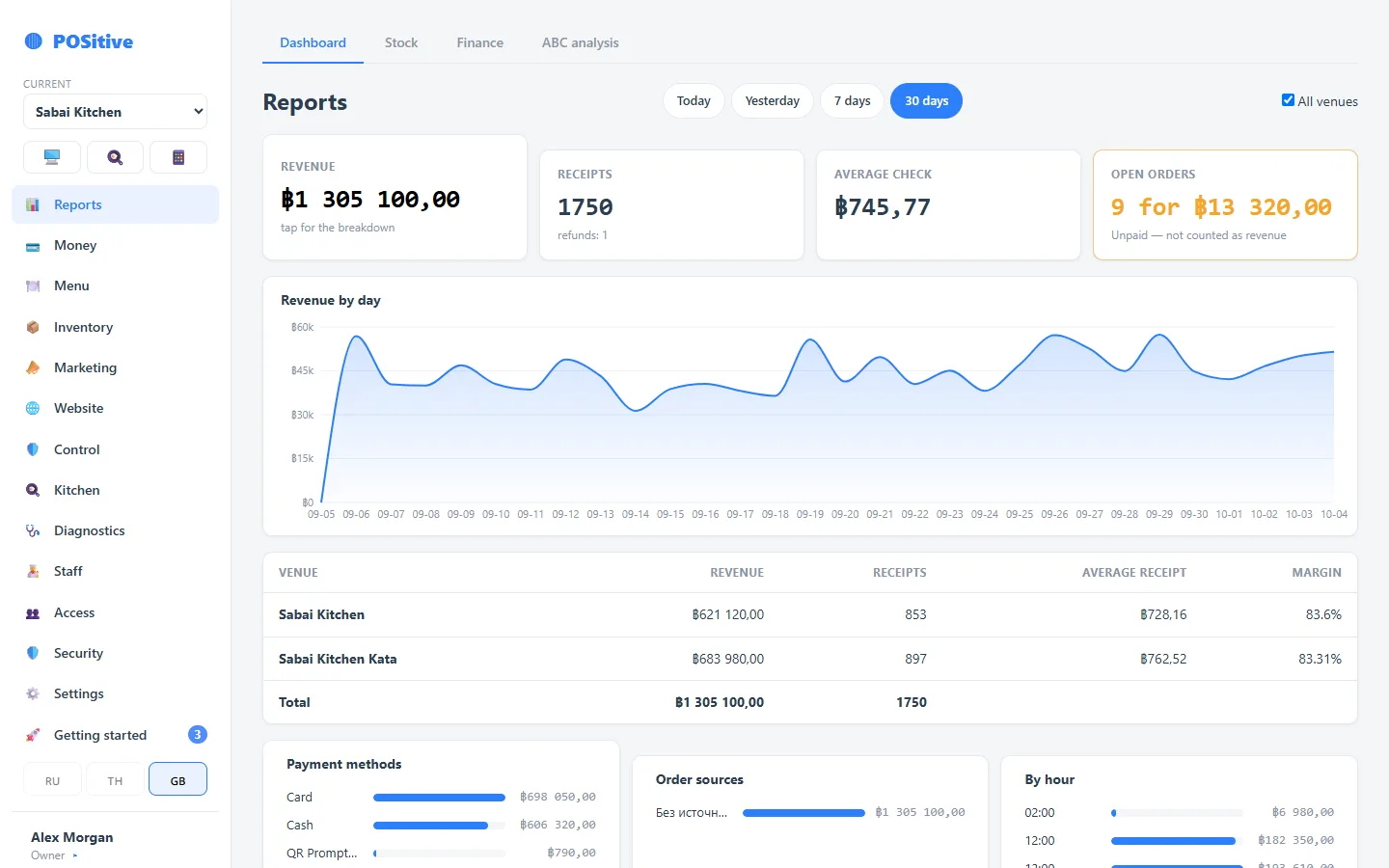
Who sees what
The boundaries are enforced by the server, not by hidden buttons: a franchisee cannot open another venue, even knowing its address.
| Franchisor — account owner | Franchisee — venue owner | Venue staff | |
|---|---|---|---|
| Group venues | all — combined and each one | only their own | only their own |
| Revenue, receipts, reports | for the whole group and by venue | for their venue | according to their permissions |
| Money and accounts | of all venues | of their venue | according to their permissions |
| Menu and recipes | of all venues | of their venue: edit or view only — the franchisor decides | according to their permissions |
| People and roles | adds venues, appoints franchisees | their own staff | — |
| Subscription | pays for all venues in the account | — | — |
Partners in one account
The franchisor adds a venue and appoints the partner as its owner. From then on the franchisee adds their own people and assigns their roles — but only in their own venue. Only the franchisor sees the list of everyone in the group and the combined figures.
- One login per person, with a separate role and PIN in each venue
- Permissions are set by section: a franchisee can keep sales, inventory and people, while the right to change the menu and prices is removed
- A franchise manager can be given the “group owner” flag — they will see all venues
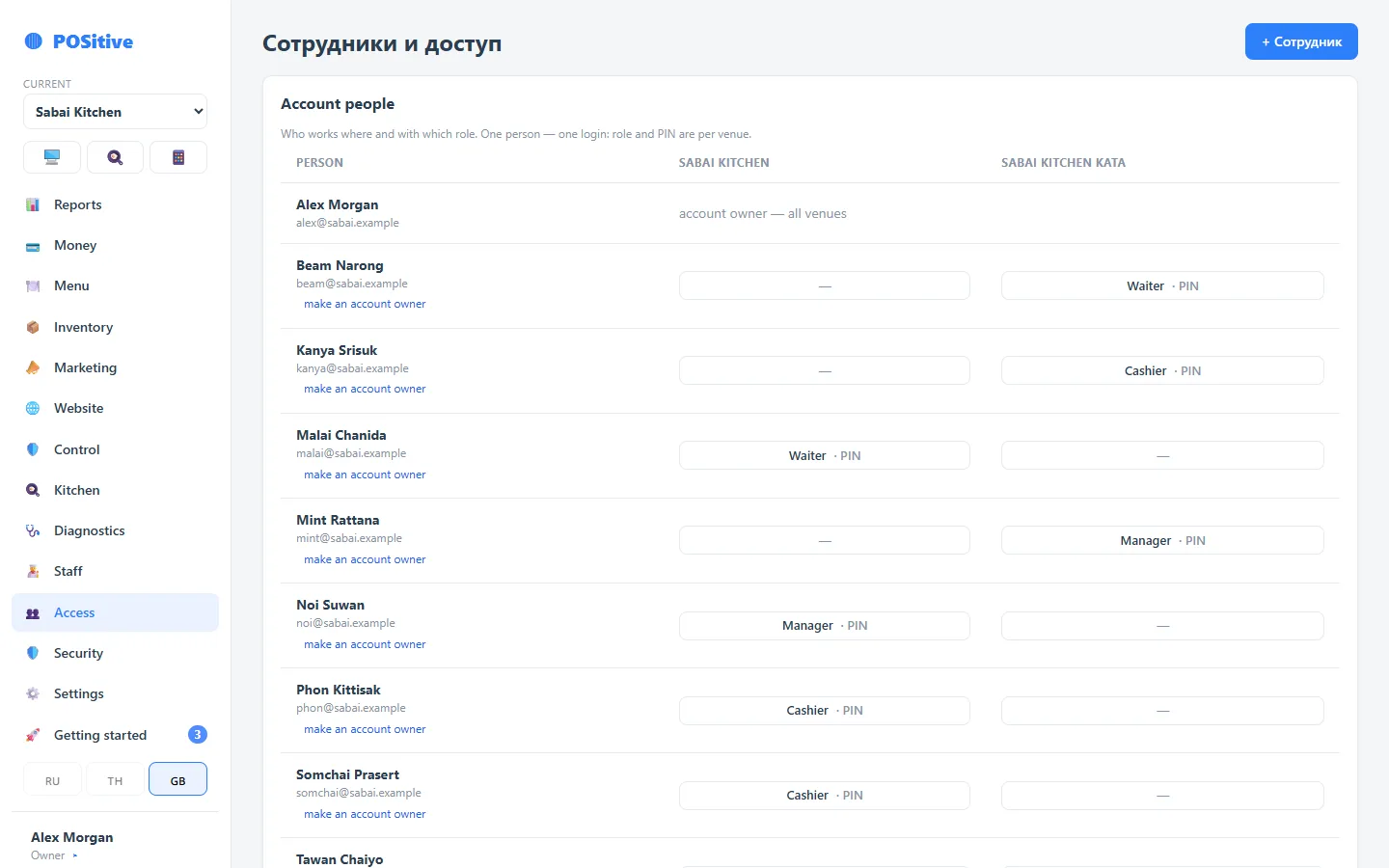
The same recipes and the food cost of each venue
A recipe shows how much of each ingredient goes into a dish and what it costs at the venue’s own purchase prices. The franchisor can see in which venue the same dish costs more and look into the purchasing.
- Cost and margin of every dish in every venue
- Voids after the kitchen, discounts and closings without payment — in each venue’s Control, with names
- ABC analysis shows which dishes bring a venue most of its revenue and which rarely sell
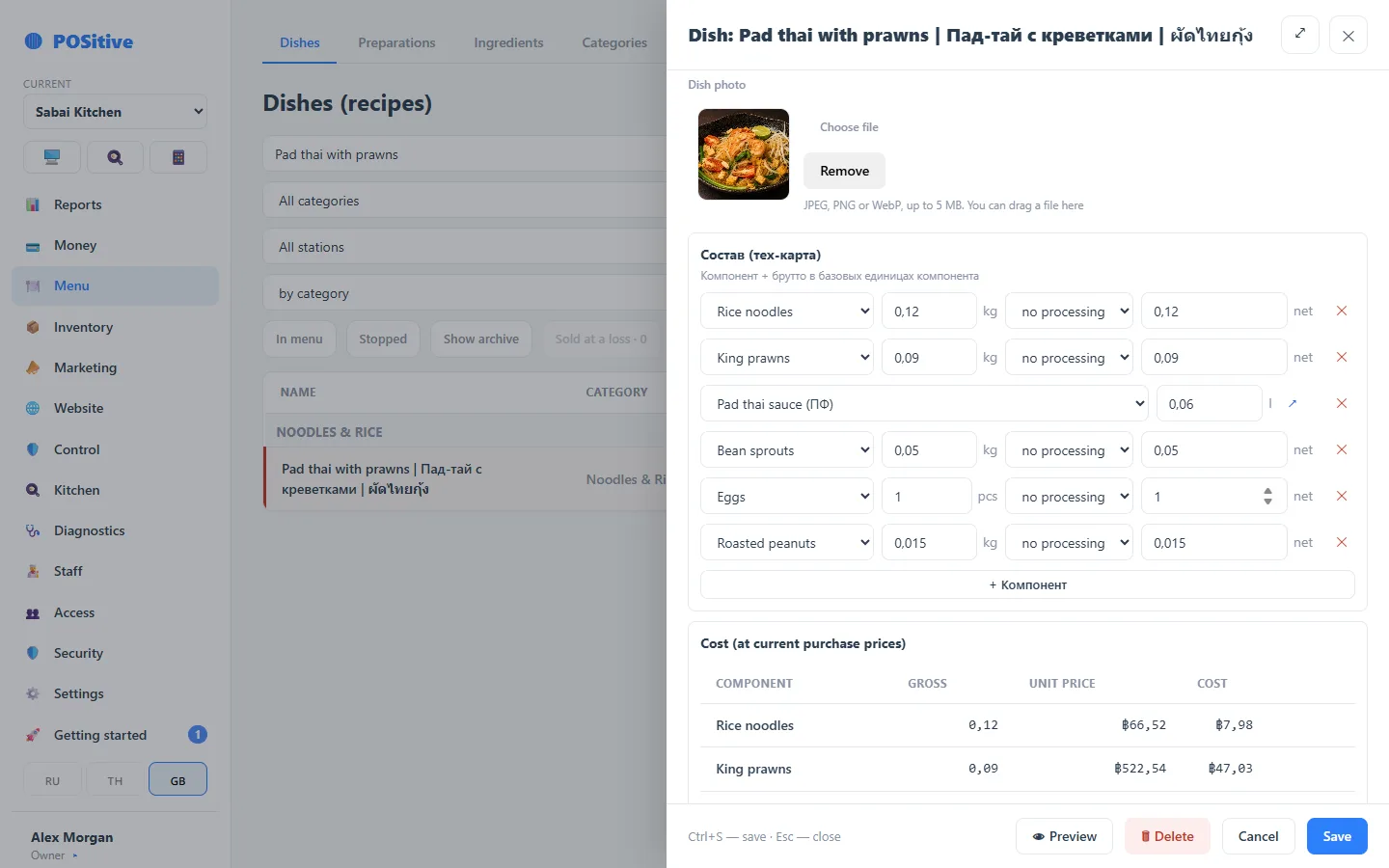
Supplies from the central kitchen — with receiving
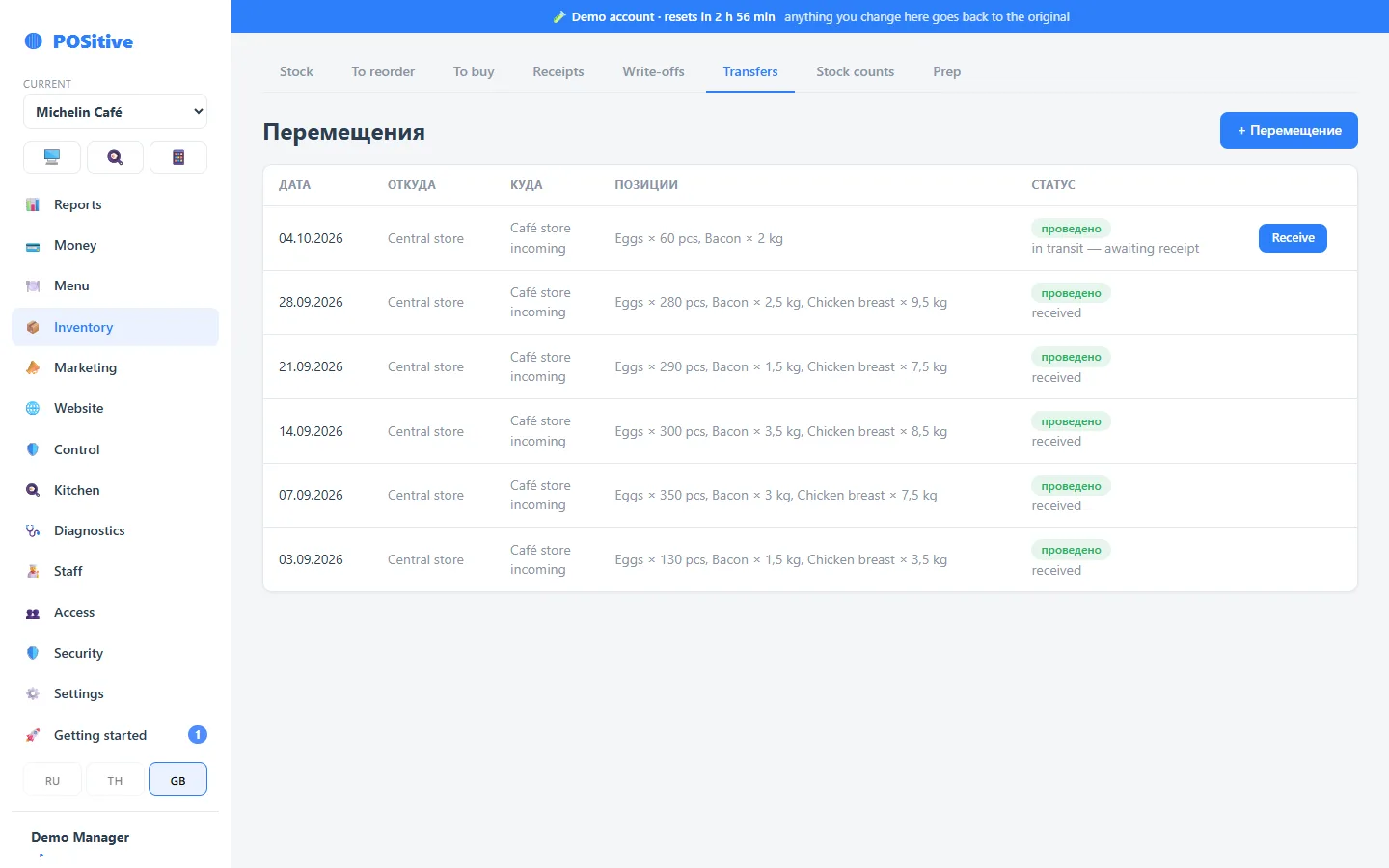
A prep kitchen or central warehouse is just another venue in the account. A dispatch reduces its stock, and the partner receives the delivery at their end: each line is linked to their product card, and the cost travels with the product.
- Until the partner accepts the delivery, it is shown as “in transit” on both sides
- Received less than was dispatched — the shortfall is shown in the document
- The partner’s food cost is based on the price at which the product came from the central kitchen
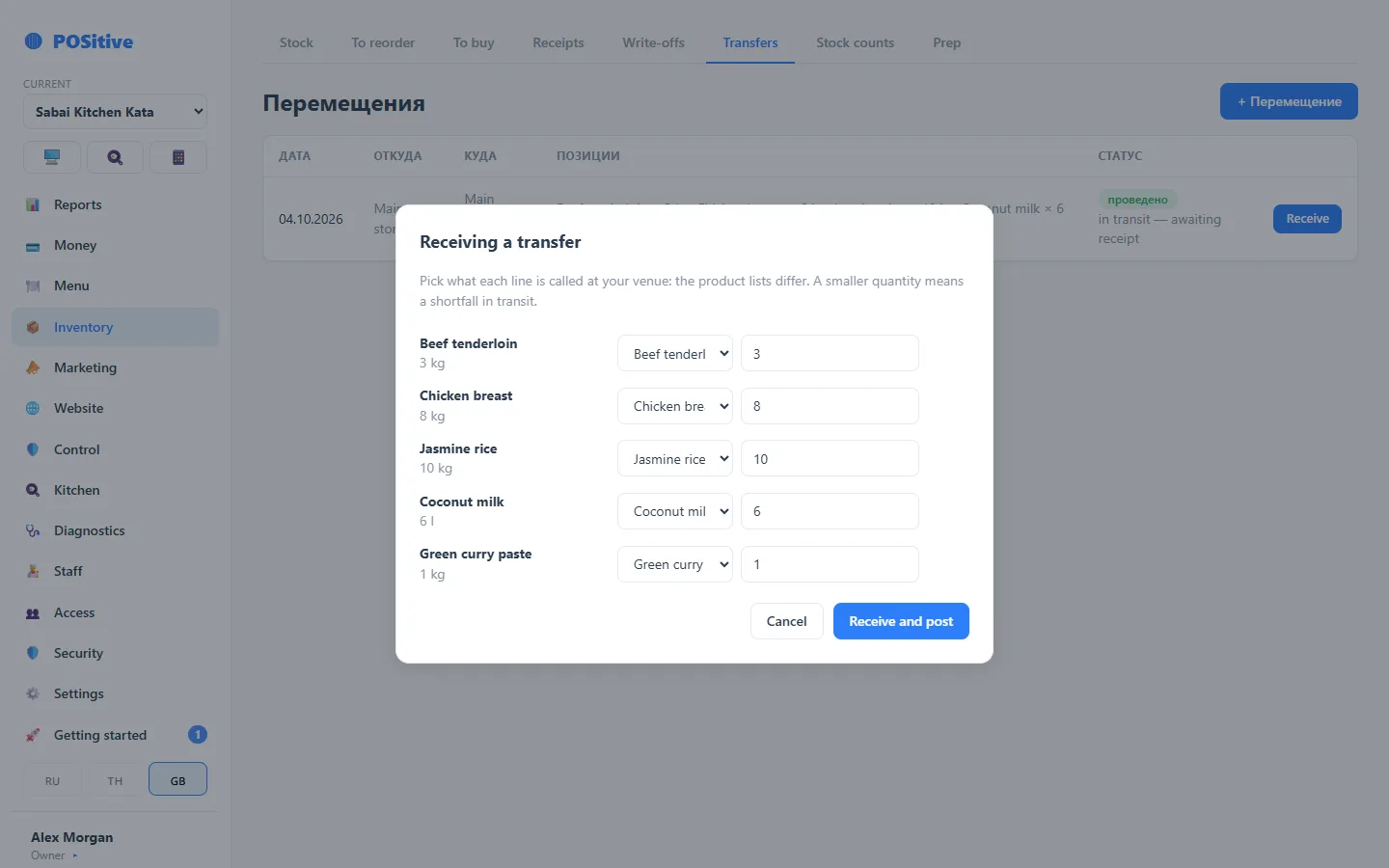
Figures for royalties and for talking to a partner
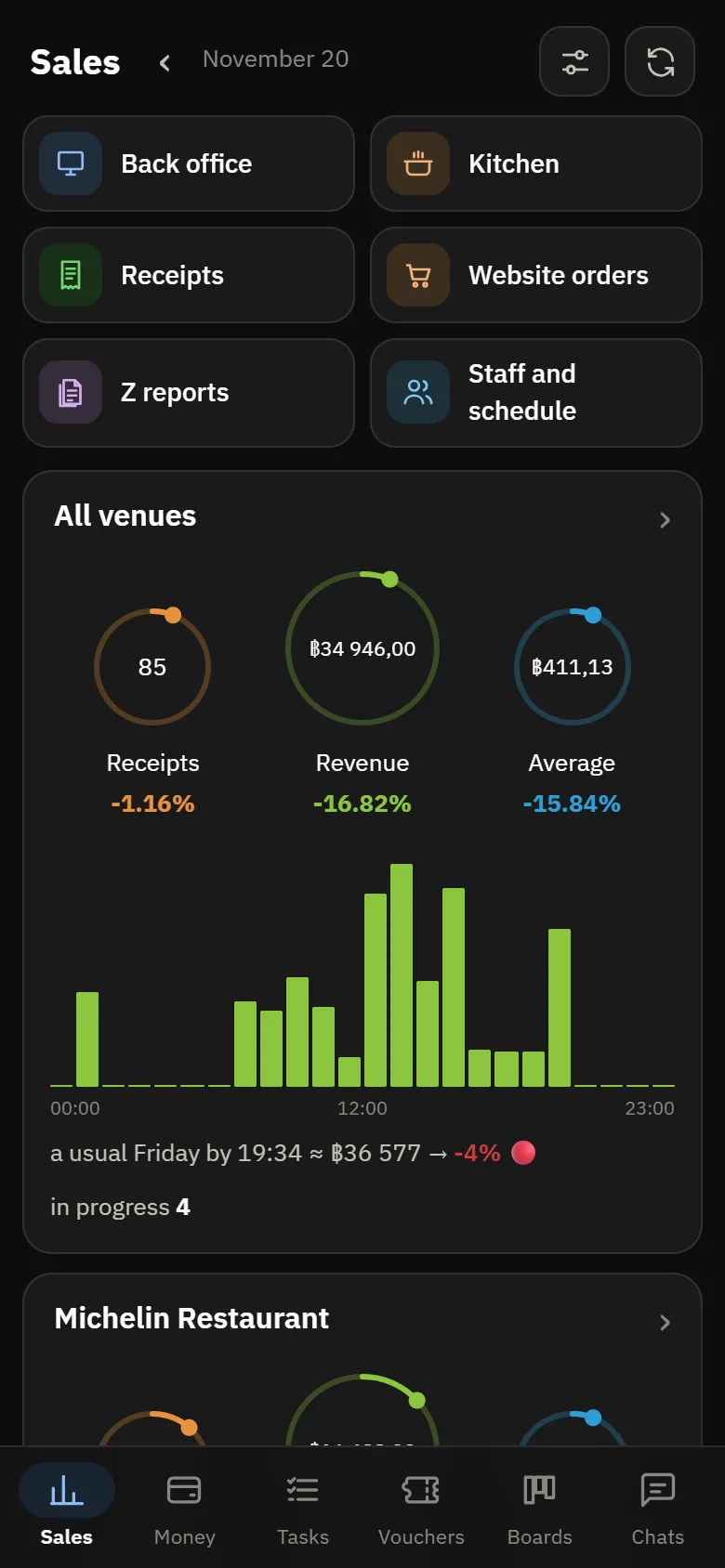
The “All venues” report puts the venues side by side as rows: revenue, receipts, average check, margin. Monthly revenue is the basis for your percentage. POSik shows the same on the phone, and shift results from all venues can be gathered in one Telegram chat.
- Any period: day, week, month, custom dates
- Each venue opens separately — receipts, shifts, money
- The system does not yet calculate royalties or invoice the partner: the percentage is worked out from the combined report
What else a franchise will find useful
One kitchen — several brands
The cook sees orders from several venues as a single queue — for a kitchen that cooks under different brands.
A food court of your own brands
Neighbouring venues of the group sell each other’s dishes at one table, and the register splits the money itself.
Learn more →Partners in different countries
Each venue has its own time zone and currency; the interface is Russian, English or Thai, set on each device.
Data stays when a partner leaves
A venue can be closed: sign-in to it is closed, while receipts, inventory, money and the log stay with the franchisor.
Tamper-proof log
Every action on receipts and inventory is kept in the history, so disputes with a partner can be settled on actual data.
Learn more →Subscription per venue
Each venue costs the same; for a group of five or more venues we quote separately.
Learn more →How to launch a new franchise venue
- 1
Add the venue
“Settings → Venue → Venues → + Venue”: name, time zone, currency. The register, inventory and accounts appear at once.
- 2
Appoint the partner
“Access → Account people”: the venue owner role and a PIN — only in their venue. They will add their own team.
- 3
Move the menu
We move the menu and recipes of the reference venue on request; the partner checks the prices at their end.
- 4
Install the register
The partner installs the register on their tablet from a link, and printers connect to the same network.
- 5
First shift
Its revenue is visible to the franchisor the same day — in the “All venues” report and in POSik.
What is not there yet
Limitations worth knowing in advance:
- royalties and franchisee invoices are not calculated by the system — the percentage is worked out from revenue in the combined report;
- there is no single menu rolled out to all venues — each venue has its own menu; we move a new venue’s menu on request;
- there is no separate franchisee account with read-only access for the franchisor — combined figures are visible only within one account, so the group’s venues live in the franchisor’s account;
- there are no group-wide discounts and vouchers — they are set up in each venue.
Questions about franchising
Will a franchisee see the group’s other venues?
No. Only the account owner sees the list of all venues, the group’s people and the combined figures. A franchisee, even with the “Owner” role in their own venue, sees only that venue.
Can I stop a franchisee from changing prices and recipes?
Yes. Role permissions are set by section: a franchisee can keep sales, inventory and people, with the menu view-only. Permissions are checked by the server, not by hidden buttons.
Who pays for the subscription?
The subscription is per venue and is paid by the account — that is, by the franchisor. How to recharge it to partners is up to your agreement. For a group of five or more venues we quote separately — see pricing.
What happens to the data if a partner leaves?
The venue can be closed: it disappears from the switcher and the combined figures, sign-in to it is closed, while receipts, inventory, money and the log remain. A closed venue can be brought back.
A partner already has their own POSitive account — how do we connect it?
Combined figures are visible only within one account, so the partner’s venue has to live in the franchisor’s account. Write to us and we will discuss moving it.
See the group through the franchisor’s eyes
The demo has two venues under one brand: Michelin Restaurant and Michelin Café. You sign in as the account owner — you see both, the combined report and each one’s kitchen display. The restaurant acts as the central kitchen: in the cafe, a delivery dispatched half an hour ago is waiting to be received. A partner with the “Owner” role in their own venue would see only that one.
- Every 3 hours the demo resets — you can change permissions, the menu and prices
- The top bar always shows how long until the next reset
Tell us about your franchise
Write how many venues you have, whether there is a central kitchen and what a partner should see — we will advise how to set it up.